

Choose Hosting That Scales Before Your Traffic Does
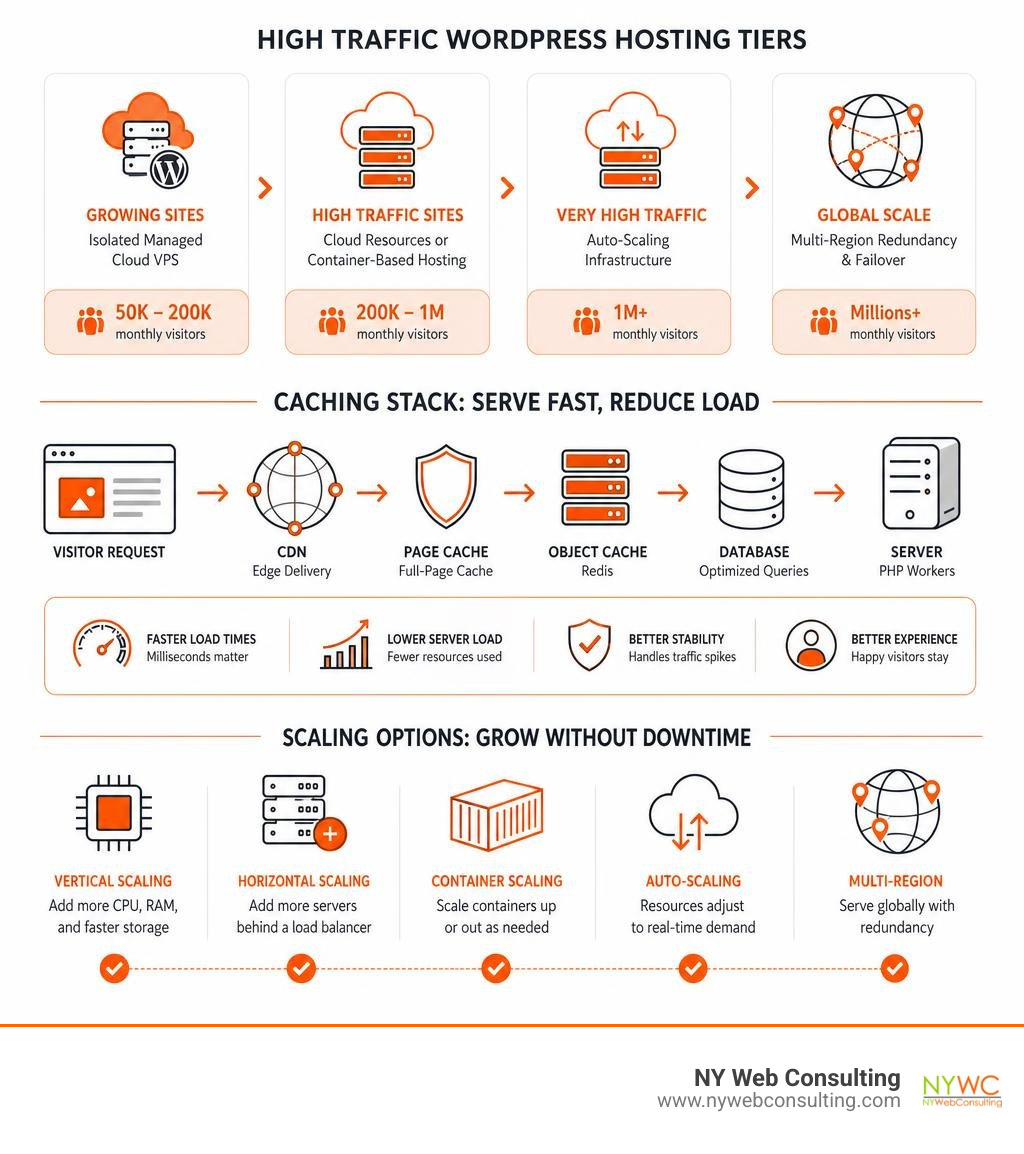
The best hosting for high traffic WordPress sites depends less on a brand name and more on your traffic pattern and site type. For most growing business sites, an isolated managed cloud VPS with server-level caching, Redis, and a CDN is the best value from roughly 50,000 to 200,000 monthly visitors. Sites approaching 200,000 to 1 million visitors need more flexible cloud resources or container-based hosting, while major publishers and event-driven sites need true auto-scaling and multi-region redundancy.
Avoid relying on low-cost shared plans once traffic or revenue matters. They often limit CPU, memory, and PHP workers, so a busy neighboring site can slow yours down. A cached WordPress page can be served in milliseconds, while an uncached request may take hundreds of milliseconds and put far more pressure on PHP and the database.
The right host should provide:
- Dedicated or clearly allocated CPU and RAM
- Full-page server caching and Redis object caching
- CDN and DDoS protection for traffic surges
- Automated backups, SSL, malware monitoring, and staging
- A clear upgrade path without surprise bandwidth or visitor overages
I’m Brian Butrym of NY Web Consulting, where we build fast, dependable, search-friendly websites for businesses that need results without constant technical distraction. In evaluating the best hosting for high traffic WordPress sites, I focus on the practical mix of speed, security, reliable scaling, and cost rather than flashy “unlimited” claims.
Related content about best hosting for high traffic wordpress sites:
Essential Architecture Behind High-Performance WordPress Hosting
When a website grows past the standard threshold into heavy traffic—typically 400,000 to millions of monthly pageviews—the underlying infrastructure architecture makes or breaks your business. On an entry-level shared host, your website shares memory pools, disk I/O, and CPU cycles with hundreds of noisy neighbors. When one site gets hit with a traffic spike or runs a messy script, your site slows down or crashes entirely.
To deliver consistent sub-second page load times and preserve your Core Web Vitals, enterprise-grade hosting architectures decouple static assets, cache recurring dynamic requests in memory, and optimize database read/write throughput. Recent benchmarks on high-concurrency cloud hosting demonstrate that proper caching and dedicated thread isolation can yield up to a 50x improvement in Time to First Byte (TTFB).
Server-Level Full-Page Caching and Edge Delivery
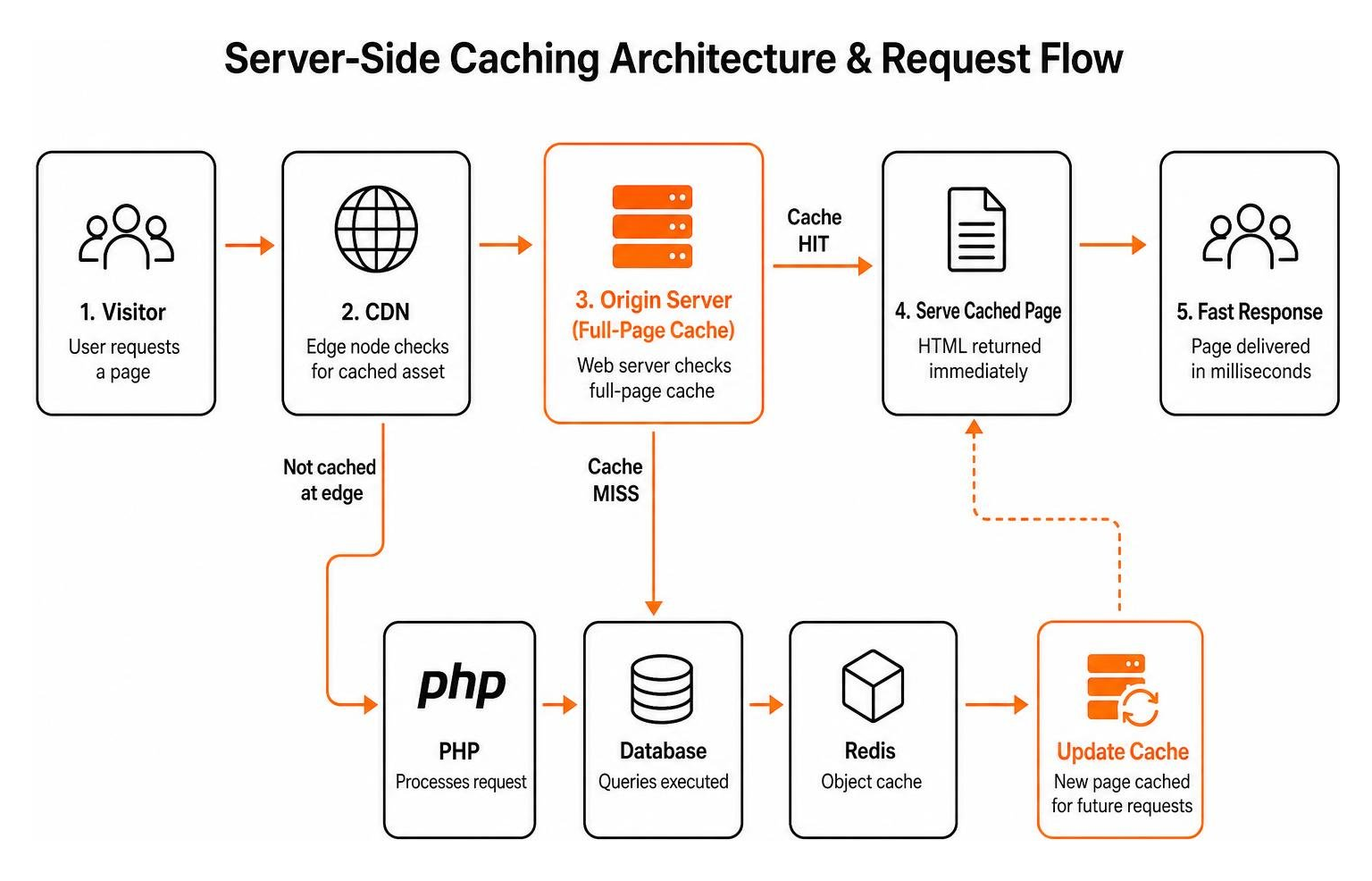
Standard WordPress installations spin up PHP and query MySQL for every single visitor. Serving a cached WordPress page directly from the web server layer takes just 5 to 15 milliseconds, whereas executing an uncached page requires 200 to 800 milliseconds of compute time.
By utilizing Nginx FastCGI caching, LiteSpeed cache, or an advanced Varnish engine, the server saves a pre-rendered HTML snapshot of your pages. When a visitor arrives, the web server returns the static HTML immediately without waking up PHP or querying the database. When paired with an enterprise edge CDN such as Cloudflare or Fastly across 70+ global edge locations, 60% to 80% of total site requests get offloaded entirely from your origin server, keeping global TTFB well under 100 milliseconds.
In-Memory Object Caching and Database Query Optimization
While full-page caching works miracles for anonymous visitors, dynamic queries still require real-time processing. Every time WordPress renders a dynamic widget, checks user permissions, or loads custom post types, it performs database lookups.
An in-memory data store like Redis or Memcached intercepts these requests. Redis stores the results of repetitive database queries directly in RAM, reducing MySQL query loads by 40% to 70%. In addition, high-traffic servers require custom tuning of the MySQL InnoDB buffer pool size (allocating 50% to 70% of available server RAM on database instances) to keep active tables loaded in memory and prevent slow disk reads.
PHP-FPM Worker Sizing and Concurrency Tuning
PHP-FPM (FastCGI Process Manager) handles the dynamic execution of WordPress core, plugins, and themes. Each PHP worker can only process one active dynamic request at a time. If your server receives 30 simultaneous uncached requests but only has 10 PHP workers configured, 20 visitors are forced to wait in a queue. If that queue fills up, users receive frustrating 504 Gateway Timeout errors.
Tuning PHP-FPM involves configuring dynamic or on-demand worker pools based on available system memory. By balancing memory per worker (typically 64MB to 128MB per dynamic process) with dedicated CPU threads, your server processes concurrent requests smoothly without running out of RAM. Understanding how infrastructure handles traffic is critical when evaluating What Are Lead Generation Websites designed to convert heavy visitor volumes into reliable sales pipelines.
Choosing the Best Hosting for High Traffic WordPress Sites by Traffic Tier
Not every growing business needs a multi-thousand-dollar enterprise cloud cluster right out of the gate. Choosing the right architecture means matching your actual traffic volume and dynamic requirements with the right hosting environment. Reviewing independent server testing data confirms that moving up through structured hosting tiers keeps performance high while controlling operational overhead.
| Monthly Visitors | Hosting Architecture | Typical vCPU / RAM | Primary Use Case | Estimated Monthly Cost |
|---|---|---|---|---|
| 50K – 200K | Managed Cloud VPS | 2–4 vCPUs / 4GB–8GB RAM | High-traffic blogs, corporate sites, lead generation portals | $30 – $150 |
| 200K – 1M | Isolated Container Clusters | 4–8 vCPUs / 8GB–16GB RAM | High-traffic publishers, LMS platforms, active WooCommerce | $150 – $600 |
| 1M+ | Multi-Region Auto-Scaling Cloud | Clustered instances / 16GB–64GB+ | Enterprise platforms, media hubs, viral events, large networks | $600 – $2,500+ |
Managed Cloud VPS for 50,000 to 200,000 Monthly Visitors
For business websites generating between 50,000 and 200,000 monthly visitors, a managed Cloud Virtual Private Server (VPS) offers an ideal balance of raw performance and predictable monthly pricing. Providers running on isolated virtual slices (such as optimized DigitalOcean, Vultr High Frequency, or Linode instances managed via modern control planes) ensure your CPU cores and RAM are 100% dedicated to your site.
Configured with 4GB to 8GB of RAM, Nginx FastCGI caching, and Redis, a managed VPS handles high concurrent traffic without breaking your budget. This setup is popular among the Best Lead Gen Websites that require maximum uptime and fast loading speeds to secure high organic rankings and steady conversion rates across New York City and beyond.
Isolated Container Clusters for 200,000 to 1,000,000 Monthly Visitors
As traffic approaches the one-million-visitor mark, sites with high dynamic activity—such as membership platforms, online academies, and busy online stores—require containerized hosting infrastructure.
Platforms utilizing isolated container technologies (such as LXD containers on Google Cloud C2/C3D instances or high-performance LiteSpeed servers) assign isolated resources to every account. Because each container operates in its own environment with dedicated PHP worker allocations, traffic surges on one section of your site will not crash your web server. Container setups also scale vertical resources instantly without manual server provisioning.
Multi-Region Auto-Scaling Cloud Infrastructure for 1M+ Monthly Visits
When sites serve millions of pageviews every month or host major media events, single-server setups reach their physical limits. Enterprise architectures deploy stateless WordPress clusters across redundant data centers backed by a 99.99% uptime SLA.
These enterprise setups separate the web layer, database layer, and asset storage:
- Stateless Web Application Nodes: Compute nodes scale horizontally behind elastic load balancers based on real-time CPU utilization.
- Managed Database Clusters: Dedicated primary database instances handle write operations, while read replicas distribute database queries.
- Centralized Object Storage & Edge CDN: Media libraries live in distributed cloud storage buckets (like Amazon S3), served globally through multi-CDN layers.

Balancing Server Specs, Reliability, and Overall Cost
Evaluating high-traffic hosting requires looking past surface-level marketing numbers. High storage quotas mean very little if your host restricts you to two PHP workers or throttles your CPU when more than fifty people visit your site at once.
Server Specs Required by the Best Hosting for High Traffic WordPress Sites
To guarantee lightning-fast page delivery during peak hours, make sure your hosting environment includes these baseline hardware and software specifications:
- High-Frequency Modern Compute: Look for high clock speed CPU cores (e.g., AMD EPYC, Intel Xeon Gold/Platinum, or AWS Graviton) with single-core clock speeds exceeding 3.0+ GHz for rapid dynamic PHP processing.
- Isolated NVMe SSD Storage: Enterprise-grade NVMe drives provide massive I/O throughput, preventing database read queues from backing up during traffic spikes.
- Dedicated PHP Worker Allocations: Ensure your plan explicitly lists its concurrent PHP worker allocations (a minimum of 4 to 8 dedicated workers for moderate dynamic sites, scaling up to 20+ workers for heavy concurrent loads).
- Network-Level Security & DDoS Mitigation: Real-time Web Application Firewalls (WAF), automated rate limiting, and enterprise DDoS shielding keep malicious bots from consuming server resources.
- Automated Backup Redundancy: Nightly automated backups with a minimum 14- to 30-day retention window stored in an offsite location ensure quick disaster recovery.
Key Pitfalls to Avoid When Selecting the Best Hosting for High Traffic WordPress Sites
Navigating the hosting market means watching out for common traps that leave high-traffic sites vulnerable to slowdowns:
- The “Unlimited Everything” Trap: Budget shared hosts often advertise “unlimited storage and unmetered bandwidth,” but bury strict CPU usage, memory, and concurrent connection caps inside their fine print. Exceeding those hidden limits results in throttling or account suspension.
- Relying Exclusively on WordPress Caching Plugins: Plugin-based caching mechanisms still execute partial PHP code. True high-performance hosting implements caching directly at the web server (Nginx FastCGI, Varnish) or edge CDN level.
- Ignoring Bandwidth and Visitor Overage Penalties: Some managed platforms charge steep fees if a viral blog post pushes your visitor count past your tier limit. Always calculate overage structures before committing to an annual plan.
Frequently Asked Questions About High-Traffic WordPress Hosting
How much RAM and CPU does a high-traffic WordPress site actually need?
For content-heavy blogs and lead generation sites relying on full-page caching, an optimized 4GB to 8GB RAM server with 2 to 4 dedicated CPU cores comfortably handles 100,000 to 300,000 monthly visitors. Dynamic websites—such as WooCommerce stores, online forums, and membership portals where users log in and bypass the cache—require 8GB to 16GB of dedicated RAM and 4 to 8 high-frequency vCPU cores to manage uncacheable requests without slowdowns.
How do dynamic WooCommerce and membership sites handle sudden traffic spikes?
Dynamic platforms cannot serve pre-rendered static HTML to logged-in users, active carts, or checkout pages. Handling traffic surges on these sites requires pairing an in-memory object cache (like Redis or KeyDB) with higher allocations of dedicated PHP workers and fast NVMe storage. Isolating database transactions and implementing edge rate-limiting prevents cart abandonment and checkout crashes during flash sales and marketing promotions.
Can edge caching completely replace high-performance origin servers?
No. While a well-configured edge CDN caches static assets and public pages, dynamic requests (such as form submissions, user logins, site searches, REST API calls, and administrative updates) must hit the origin server directly. If your origin server runs on low-powered hardware with limited PHP workers, even a small surge in dynamic requests will overwhelm the database and take the entire site down.
Conclusion
Scaling a high-volume WordPress website successfully comes down to matching your traffic patterns with the right infrastructure. By replacing restrictive shared hosting with dedicated cloud resources, server-level page caching, Redis query optimization, and an enterprise CDN, you protect your revenue, user experience, and search engine visibility.
At NY Web Consulting, based in Glendale, Queens, we help businesses build secure, high-performing websites engineered for growth. If you are reviewing your hosting setup and looking for a dependable foundation, check out our small business website and email hosting guide to ensure your infrastructure supports your long-term business goals.