

Why Good Hosting Services Are the Foundation of Every Successful Website
Finding good hosting services comes down to a few key factors. Here’s a quick breakdown:
| Factor | What to Look For |
|---|---|
| Uptime | 99.9% or higher (ideally 99.98%+) |
| Speed (TTFB) | Under 500ms for best performance |
| Storage | SSD or NVMe for faster data delivery |
| Security | Free SSL, daily backups, malware scanning |
| Support | 24/7 live human support |
| Price | Check renewal rates, not just intro pricing |
| Migration | Free migration tool or assisted onboarding |
Your website only exists online because a server somewhere is storing its files and sending them to visitors on demand. That server — and the company running it — is your web host. Choose well, and your site loads fast, stays secure, and helps you win business. Choose poorly, and slow load times, security gaps, and unexpected downtime quietly cost you customers every day.
The stakes are real. Independent testing across 20 hosting providers found that GoDaddy had a 68.8% load test failure rate — meaning more than two-thirds of simulated visitors hit errors under realistic traffic. Meanwhile, top performers like GreenGeeks recorded a time-to-first-byte of just 416ms, and Hostinger maintained 99.98% uptime through Q4 2025. The gap between the best and worst hosts is not small.
For small business owners in particular, your hosting choice directly affects your search rankings, your contact form reliability, and whether a visitor trusts you enough to call.
I’m Brian Butrym, founder of NY Web Consulting — a Queens-based web design and marketing firm with years of hands-on experience helping local businesses find and configure good hosting services that actually support their growth. In the sections below, I’ll walk you through everything you need to make a confident, informed decision.
Good hosting services terms made easy:
What Good Hosting Services Are and How Web Hosting Works
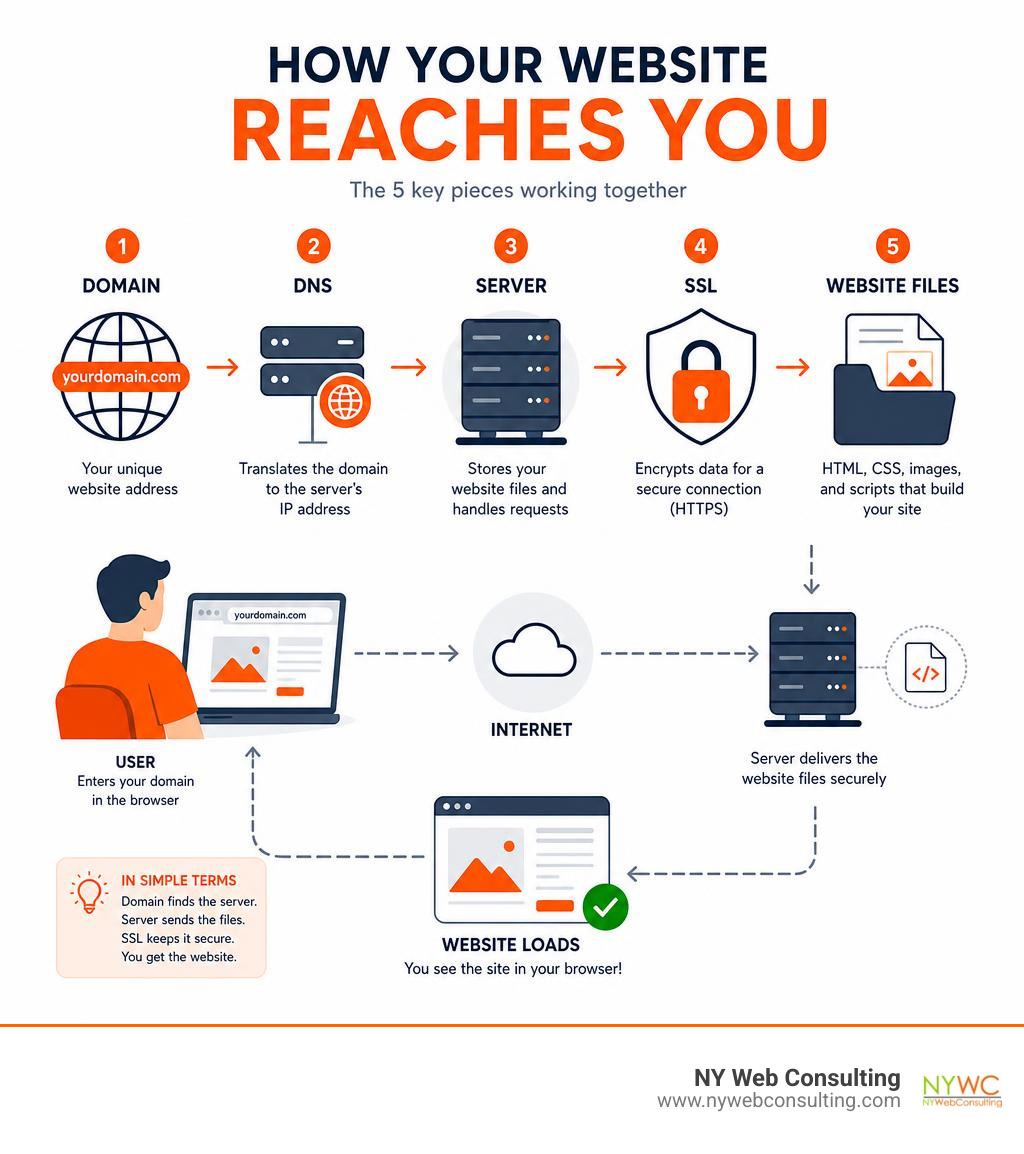
Web hosting is the service that stores your website files, databases, images, scripts, and emails on an internet-connected server so people can access your site from a browser.
Think of it this way:
- Your domain name is the address.
- DNS is the directory that tells browsers where to go.
- Hosting is the building where your website lives.
- Website files are the rooms, furniture, signs, and products inside.
- SSL is the lock on the front door.
- Bandwidth is the road traffic your site can handle.
When someone visits your website, the host sends the correct files to that person’s browser. If the server is fast, secure, and well-maintained, the visitor gets a smooth experience. If not, they may wait, see errors, or leave before the page finishes loading.
For a deeper foundation, see our website hosting explained guide.
Good hosting services explained for beginners
For beginners, good hosting services should not feel like renting a spaceship. You should be able to log in, install WordPress, set up SSL, create email accounts, view backups, and contact support without needing a computer science degree and three cups of emergency coffee.
Most small business websites use a content management system (CMS), such as WordPress. WordPress is especially important because over 40% of all websites are built on it. That popularity means many hosting plans now include one-click WordPress installation, automatic updates, caching tools, and staging options.
A beginner-friendly host usually includes:
- A simple control panel
- One-click CMS installation
- Free SSL
- SSD or NVMe storage
- Automated backups
- Email account options
- Clear upgrade paths
- Support that explains things in plain English
If you see terms like public_html, that is usually the main folder where website files live on many traditional hosting accounts. It is not scary. It is just the folder your website serves to the public.
How visitors reach your website
Here is the simplified version of what happens when someone visits your site:
- The visitor types your domain into a browser.
- DNS checks which server handles that domain.
- The browser requests the website files from the server.
- The SSL certificate helps create a secure connection.
- The server sends back the page files.
- The browser loads the design, images, text, and scripts.
A key metric here is TTFB, or time to first byte. TTFB measures how quickly the server starts responding. In 2026, a TTFB under 500ms is a strong target for most small business websites. Independent testing has shown top shared hosting environments can reach the low 400ms range, while weaker setups may be far slower.
Caching and CDN tools can also help. Caching stores ready-made versions of pages so the server does less work. A CDN, or content delivery network, can serve files from locations closer to visitors.
Why hosting quality affects leads, SEO, and trust
Hosting is not just a technical decision. It is a business decision.
Poor hosting can cause:
- Slow pages
- Failed contact forms
- Checkout errors
- Security warnings
- Email delivery issues
- Lost search visibility
- Higher bounce rates
Research commonly shows that users are impatient online. If a mobile page takes more than a few seconds to load, many visitors leave. For a local business in Queens or New York City, that could mean a missed phone call, a missed appointment request, or a lost sale.
Search engines also care about user experience. Fast, stable hosting supports Core Web Vitals, crawlability, and consistent uptime. It will not magically rank a weak website, but bad hosting can definitely hold a good website back.
Comparing Hosting Types: Shared, VPS, Cloud, Dedicated, and WordPress

Different websites need different hosting. A five-page local service website does not need the same server setup as a busy eCommerce store. Choosing the right type helps you avoid both underbuying and overpaying.
| Hosting Type | Best For | Pros | Cons |
|---|---|---|---|
| Shared Hosting | New sites, small businesses, blogs | Low cost, easy setup, beginner-friendly | Shared resources, limited power |
| VPS Hosting | Growing sites, eCommerce, membership sites | More control, dedicated resources | Requires more management |
| Cloud Hosting | Uptime-sensitive or scaling sites | Flexible, resilient, scalable | Pricing and setup can be more complex |
| Dedicated Hosting | High-control or enterprise environments | Full server control, strong performance | Expensive, technical |
| WordPress Hosting | WordPress sites and WooCommerce | Optimized for WordPress, easier updates | May be less flexible for non-WordPress sites |
Shared hosting for new websites and small businesses
Shared hosting means multiple websites use the same physical server. It is like renting an apartment in a building. You get your own space, but everyone shares the building’s main systems.
Shared hosting is usually best for:
- New business websites
- Blogs
- Portfolios
- Local service pages
- Small WordPress sites
- Starter landing pages
Typical shared hosting plans are inexpensive, often promoted in the $1 to $10 per month range. The catch is that introductory prices may rise sharply at renewal.
Shared hosting is beginner-friendly, but it has limits. CPU, RAM, storage, database usage, and file counts may be restricted. Some plans advertise “unlimited” features, but there are almost always fair-use rules, inode limits, or resource caps.
VPS hosting for growing sites
VPS stands for virtual private server. A VPS still uses a larger physical server, but your account gets a more isolated slice of resources.
VPS hosting is a better fit when you need:
- More consistent performance
- Higher traffic capacity
- More server control
- Custom software
- Better isolation
- Stronger eCommerce reliability
We often recommend looking at VPS options when a website starts getting regular traffic, running WooCommerce, hosting logged-in users, or experiencing slowdowns on shared hosting.
VPS hosting can be managed or unmanaged. Managed VPS costs more, but the host helps with updates, monitoring, and server tasks. Unmanaged VPS is cheaper but expects you to know what you are doing. In other words, unmanaged VPS is not the place to “click around and hope.”
Cloud hosting for uptime-sensitive businesses
Cloud hosting uses a network of servers instead of relying on one traditional machine. If one component has an issue, another can help carry the load.
Cloud hosting is useful for:
- Traffic spikes
- Growing businesses
- Sites that cannot afford downtime
- Multi-location audiences
- More flexible scaling
Cloud hosting can also support better redundancy. That matters for businesses that depend on appointment forms, lead generation, online payments, or active marketing campaigns.
The key is to understand pricing. Some cloud platforms use variable billing, while managed cloud plans may offer more predictable monthly costs.
Dedicated hosting for high-control environments
Dedicated hosting gives one customer an entire physical server. This is powerful, but it is usually unnecessary for most small businesses.
Dedicated hosting may make sense for:
- High-traffic websites
- Custom applications
- Compliance-sensitive systems
- Enterprise environments
- Specialized server configurations
The downside is cost and complexity. Dedicated servers can start much higher than shared or VPS plans and can reach hundreds of dollars per month depending on hardware and management.
WordPress hosting for CMS-focused websites
WordPress hosting is configured specifically for WordPress. It may include:
- WordPress caching
- Automatic updates
- Plugin management
- Staging sites
- WordPress security rules
- WooCommerce support
- Daily backups
Because WordPress powers such a large share of the web, WordPress hosting is often a smart choice for small businesses. The important detail is whether it is truly managed. Some plans are simply regular hosting with WordPress preinstalled. Others provide real WordPress-specific maintenance and support.
Key Features That Separate Good Hosting from Cheap Hosting

Cheap hosting and good-value hosting are not the same thing.
A low price is fine if the plan still includes the right fundamentals. A bargain plan becomes expensive when it causes downtime, broken forms, malware cleanup, or a painful migration later.
For business owners comparing website and email needs, we also recommend our guide to website hosting with email.
Good hosting services must balance price, renewal cost, and value
Introductory pricing is where many buyers get surprised.
A plan may look inexpensive for the first term, then renew at two, three, or four times the original price. That does not automatically make it bad, but you need to know the real cost before buying.
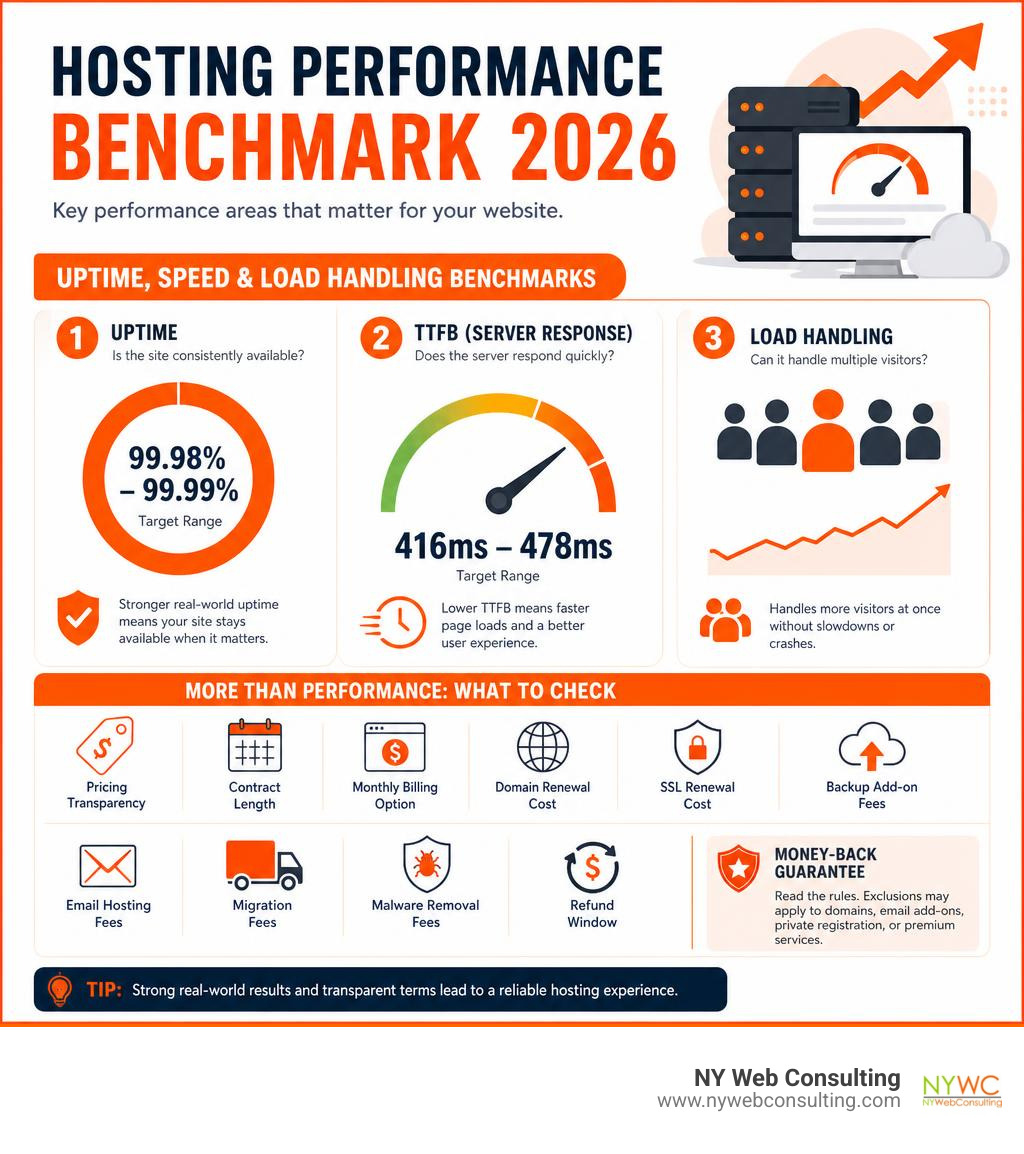
Check:
- Intro price
- Renewal price
- Contract length
- Monthly billing option
- Domain renewal cost
- SSL renewal cost, if any
- Backup add-on fees
- Email hosting fees
- Migration fees
- Malware removal fees
- Refund window
Money-back guarantees are useful, but read the rules. Some plans offer 30 days. Some offer longer. Some exclude domain names, email add-ons, private registration, or premium services.
Uptime, speed, and load handling benchmarks to check
Uptime is the percentage of time your website is available. A 99.9% uptime guarantee sounds strong, but it still allows for possible downtime over a year. Better real-world results, such as 99.98% or 99.99%, are stronger indicators.
Look at three performance areas:
- Uptime: Is the site consistently available?
- TTFB: Does the server respond quickly?
- Load handling: Can it handle multiple visitors at once?
In recent independent shared hosting tests, strong performers achieved TTFB scores around 416ms to 478ms, with uptime near 99.98% to 99.99%. That is the kind of range we like to see for business websites.
Load testing matters because a site can look fast with one visitor but fail when traffic increases. For lead generation, this is critical. Marketing works best when your website does not collapse the moment people actually show up.
Security and backup features every plan should include
At minimum, your hosting should include:
- Free SSL
- Automatic SSL renewal
- Daily backups
- Malware scanning
- Firewall or WAF protection
- DDoS protection
- Account isolation
- Two-factor authentication
- Secure file access
- Easy restore options
For online stores, security matters even more. If you process payments, use trusted payment processors and avoid storing card data directly on your own server unless you have the right compliance setup. SSL is essential, but SSL alone does not make a website fully secure.
Backups are your insurance policy. Daily backups are good. Real-time or more frequent backups are better for active eCommerce sites.
Support, migration, and ease of use
Support quality can make or break the experience.
Good support should help with:
- DNS questions
- SSL setup
- Migration issues
- Email configuration
- Backup restoration
- Server errors
- WordPress troubleshooting
- Nameserver changes
Many hosts offer automated migration tools. Some offer assisted migration. For small business owners, assisted migration is often worth it because DNS, email, SSL, and database details can get messy.
Good hosting should make basic tasks simple. If every small change requires a support ticket, your hosting may technically work, but it is not working efficiently for your business.
2026 Comparison Framework for Shared Hosting Plans
In May 2026, shared hosting is still the most common starting point for new websites. The market is crowded, and many plans look nearly identical on the surface.
To compare them properly, we use three categories:
- Performance
- Features
- Value
For speed-focused evaluation, see our fast hosting benchmarks guide.
How to evaluate shared hosting without relying on brand hype
Do not choose hosting based only on ads, badges, or “best host” lists. The better method is to look at evidence.
Check whether testing includes:
- Real hosting accounts
- Real WordPress installs
- Uptime monitoring
- TTFB testing
- Load testing
- Quarterly or ongoing results
- Storage and inode limits
- Backup policy details
- Server hardware information
- Support quality
Also check the fine print behind “unlimited.” Unlimited bandwidth usually does not mean unlimited server resources. It often means your site is fine as long as it stays within normal usage.
Best value use cases in 2026
The best value depends on what you are building.
For a WordPress blog:
- Look for WordPress caching, automatic updates, and backups.
For a local business website:
- Prioritize speed, uptime, SSL, support, and professional email.
For WooCommerce:
- Look beyond basic shared hosting if you expect regular sales or logged-in users.
For multi-site hosting:
- Check how many websites are allowed, but also storage, backup, and resource limits.
For agencies or growing companies:
- Consider managed hosting, staging, collaboration tools, and reliable migration support.
For global visitors:
- Look for strong global TTFB, data center choices, and CDN compatibility.
Performance red flags to avoid
Avoid hosting plans with:
- Slow TTFB
- Frequent downtime complaints
- Failed load tests
- No clear backup policy
- Vague resource limits
- No free SSL
- Expensive renewal surprises
- Poor support access
- Outdated control panels
- No migration help
- No upgrade path
If a plan is cheap but missing backups, security, and support, it is not really cheap. It is just postponing the bill.
Local infrastructure and managed hosting considerations
For businesses in Glendale, Queens, and New York City, local performance matters. Your hosting does not always need to be physically in NYC, but server location, CDN setup, and DNS performance affect how quickly local visitors experience your site.
Local businesses should think about:
- Fast load times for regional visitors
- Reliable contact form delivery
- Secure hosting for inquiries and payments
- Professional domain email
- Redundancy for busy campaigns
- Managed support for non-technical teams
At NY Web Consulting, we look at hosting as part of the full website system. A beautiful site on weak hosting is like putting a sports car engine in a shopping cart. Interesting, but not ideal.
Choosing, Migrating, and Maintaining Your First Hosting Plan
Choosing hosting is only step one. You also need to launch, migrate, secure, and maintain the site correctly.
Our small business hosting guide explains how hosting, email, and website planning fit together.
Good hosting services checklist for beginners
Before buying a plan, ask:
- What is my monthly budget after renewal?
- How much traffic do I expect?
- Am I using WordPress?
- Do I need eCommerce?
- Do I need business email?
- Is SSL included?
- Are backups automatic?
- How often can I restore backups?
- Is storage SSD or NVMe?
- Is bandwidth metered?
- Is support available 24/7?
- Is migration included?
- Can I upgrade without rebuilding everything?
For most first websites, shared or managed WordPress hosting is a reasonable starting point. For serious eCommerce, membership, or high-traffic sites, start evaluating VPS or cloud options earlier.
How to migrate an existing website safely
A safe migration follows a plan:
- Create a full backup of files and database.
- Export email if email is moving too.
- Set up the new hosting account.
- Copy website files using a migration plugin, FTP, or host migration tool.
- Import the database.
- Test the site on staging or a temporary URL.
- Reissue or activate SSL.
- Update DNS or nameservers.
- Monitor the site during propagation.
- Keep the old hosting active until the new setup is confirmed.
DNS propagation can take up to 48 hours, though it is often faster. During this window, some visitors may reach the old server while others reach the new one. That is normal.
Email migration deserves special care. If your email is tied to your hosting account, changing hosts without planning mail records can interrupt messages.
What to expect after switching hosts
After switching, check:
- Homepage and key service pages
- Contact forms
- Checkout process
- Login pages
- SSL certificate
- Images and media files
- Redirects
- Broken links
- Analytics tracking
- Search Console verification
- Sitemap submission
- Email sending and receiving
You may also need to clear caches at the website, server, CDN, and browser levels. If the site looks “half moved,” cache is often the culprit. Cache is helpful, but sometimes it behaves like a stubborn office printer.
Long-term maintenance after hosting setup
Hosting is not a one-time decision. A healthy website needs ongoing care.
A good maintenance routine includes:
- Daily backups
- Uptime monitoring
- Security scans
- Plugin and theme updates
- CMS updates
- Performance checks
- Form testing
- Monthly reporting
- SEO health checks
- Emergency response planning
Website maintenance costs vary by site complexity. A simple small business site may need a lighter plan, while eCommerce needs more frequent monitoring, stronger backups, and faster response times.
Frequently Asked Questions about Good Hosting Services
Below are the questions we hear most often from business owners comparing good hosting services in 2026.
Are very cheap hosting plans worth using?
Sometimes, but only if they include the essentials.
A very cheap plan may be fine for a personal blog, test project, or very small brochure site. For a business website, be careful. The risks are slow performance, weak support, missing backups, storage caps, and expensive renewal rates.
The better question is not “What is the cheapest plan?” It is “What is the lowest-cost plan that will not hurt my business?”
Look for value, not just price.
When should I upgrade from shared hosting?
Upgrade when you notice signs that shared hosting is holding you back.
Common signs include:
- Pages are getting slower
- Traffic is increasing
- Contact forms fail during busy periods
- Checkout errors happen
- You hit CPU or memory limits
- Your host warns about resource usage
- You run WooCommerce or membership features
- Multiple users log in at the same time
- You need more control over server settings
For many growing businesses, the next step is VPS, managed WordPress, or managed cloud hosting.
Do I need email hosting with my website hosting?
If you run a business, yes, you should use domain-based email such as [email protected].
Some hosting plans include email. Others charge extra or expect you to use a separate email platform. Separate email hosting can offer better deliverability, spam filtering, storage, and reliability.
When planning hosting, ask:
- How many mailboxes do we need?
- Is spam filtering included?
- How much storage is provided?
- Can support help configure DNS records?
- Will email be affected during migration?
For more planning help, see The Ultimate Guide to Domain Mail Hosting and Web Services.
Conclusion
Good hosting services give your website the foundation it needs to load quickly, stay secure, support SEO, and convert visitors into leads. The right choice depends on your website type, traffic, budget, technical comfort, and growth plans.
For most small businesses in Glendale, Queens, and New York City, the best path is simple:
- Start with reliable hosting, not just cheap hosting.
- Prioritize uptime, speed, SSL, backups, and support.
- Watch renewal pricing.
- Plan migration carefully.
- Maintain the site after launch.
- Upgrade when your traffic and business needs grow.
At NY Web Consulting, we build fast, secure, SEO-friendly websites designed to become lead generation tools. Hosting is a major part of that system. If your website is slow, unstable, or difficult to manage, we can help you audit the setup and plan a better path forward.
Ready to simplify your website, hosting, and email setup? Start here: Plan your all-in-one small business website and hosting setup.